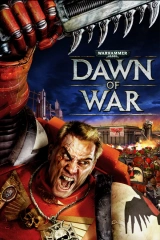
Titanium Wars Mod for Definitive Edition and Soulstorm
Mod for Warhammer 40,000: Dawn of War (2004) | Category: Total Conversion
Author: GrOrc | Curator: Modbadger
Mod for Warhammer 40,000: Dawn of War (2004) | Category: Total Conversion
Author: GrOrc | Curator: Modbadger
Titanium Wars Mod (TWM) is a major mod for Dawn of War Definitive Edition, Soulstorm, and Dark Crusade. Rather than radically overhauling the game, it carefully expands upon Relic's original vision. If you love classic DoW gameplay but crave larger, more spectacular battles in the Warhammer 40,000 universe — this mod is for you.


Localizations:

Localizations:
The mod is localized into 1 language
(You don’t need to download anything extra to play in these languages)
It is one of the oldest mods for Warhammer 40,000: Dawn of War, with development beginning in 2008, crafted with deep respect for the original game. Despite TWM's core motto — "All Warhammer 40,000 units must be in DoW!" — the game preserves balance and original gameplay, never changing things just for the sake of change. At Tier 1, you will feel almost exactly as you did in vanilla Soulstorm — that is intentional. TWM is a layer built on top of a classic, not a replacement for it.
Titanium Wars Mod now supports not only Soulstorm and Dark Crusade, but also the Definitive Edition.
Key Features
13 balanced playable races, including all 11 classic tabletop factions: Space Marines, Chaos, Orks, Eldar, Imperial Guard, Tau, Necrons, Dark Eldar, Witch Hunters, Daemon Hunters, Tyranids — each with a vast number of new units, buildings, abilities, and technologies.
Titans and titan-class units for all races — TWM is historically the first DoW mod to implement them across all game modes, proving to the community that a balanced game with Titans is possible.
Commanders with wargear — hero equipment from the campaign is now available in skirmish and multiplayer, researched in dedicated buildings.
RPG elements (CutterShane's Heroes System): units gain experience and ranks in battle.
A fully reworked campaign — improved strongholds with new SCAR scripts, all new units available in story mode. TWM is the only global DoW mod with true campaign support.
Stable skirmish and multiplayer with carefully tuned balance.
Reworked AI: the computer opponent is aware of all new units, can build and deploy them, including using special abilities.
Air assault for Imperial Guard (Valkyrie), Orks (Fighta-Bomma), Space Marines (Thunderhawk), Witch Hunters, and Tau (Orca Dropship).
Reworked weapon range system — aligned with W40k Codexes while preserving RTS balance.
New hotkey system — all actions logically mapped to 12 keys on the left side of the keyboard, easy to memorize under pressure.
High-quality 3D models with correct animations and behavior — many models significantly improved at the geometry, OE, and AE code level. Several models (XV104 Riptide, Ork Gargant, Necron Annihilation Barge, etc.) were created specifically within TWM.
Excellent optimization: no ultra-heavy textures or effects.
Race Highlights
Chaos — Chaos Gods Temple system: choose a patron (Khorne, Nurgle, Tzeentch, Slaanesh, or Undivided Chaos), altering the available roster and unlocking unique global abilities; themed Marines, minor and greater daemons for each god, new buildings and vehicles.
Imperial Guard — expanded command staff (Field Medic, Vox-Caster, Commissar), numerous new Leman Russ variants, three super-heavy tanks (Baneblade, Shadowsword, Stormblade), Valkyrie air assault.
Eldar — new Aspect Warriors (Striking Scorpions, Swooping Hawks, Shining Spears), expanded grav-vehicle roster, new Commander Autarch, super-heavy Scorpion and Revenant Titan.
Necrons — fully reworked C'tan as independent summonable units with unique abilities, the Beacons system from the campaign, Necron Gauss Pylon as a titan-class unit.
Orks — Big Banners system, new infantry types (Ard Boys, Kommandoz, Burna Boyz), expanded vehicle roster, three titan-class units: Battle Fortress, Kustom Stompa, and Gargantuan Squiggoth.
Titanium Wars Mod strictly adheres to the spirit and rules of the Warhammer 40,000 universe, drawing on Codexes and tabletop miniatures. Over years of development, hundreds of bugs in original and third-party models have been fixed — from incorrect animations to targeting and OE-code errors. Much of GrOrc's work is now used in other Dawn of War mods. TWM is effectively a new game built on top of Dawn of War: Soulstorm, with great respect for the original.
How to install a mod Titanium Wars Mod for Definitive Edition and Soulstorm
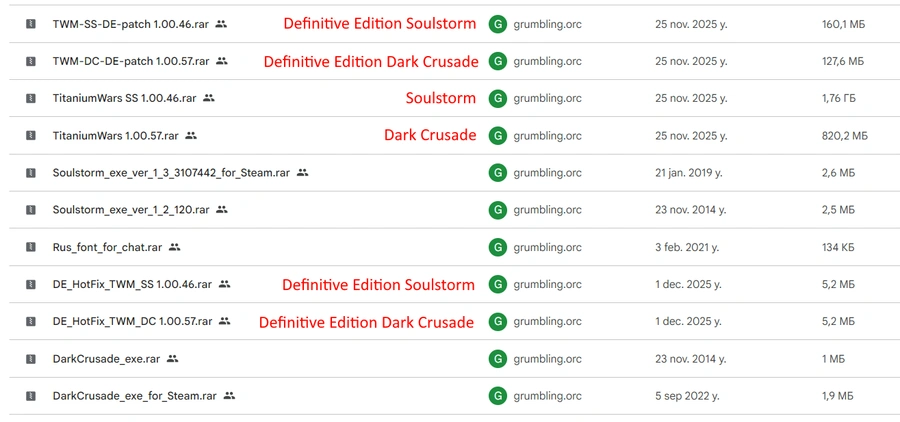
The mod may contain a large number of files, make sure you have downloaded the correct ones for your version of the game.
Dawn of War Soulstorm
Move the contents of the archive to the root directory of Dawn of War Soulstorm.
(Optional) If you want to play the campaign and have cutscenes in it, copy the Movies folder from the DXP2 directory into the Titanium_Wars_Mod_SS folder.
Launch the game, go to the "Game Manager" menu and select the mod.
Alternative launch method: create a shortcut to the executable, open its properties and add the parameter -modname TitaniumWars_SS or with additional settings -forcehighpoly -nomovies -modname TitaniumWars_SS, so that you get an entry like this: "D:\Games\Dawn of War Soulstorm\Soulstorm.exe" -forcehighpoly -nomovies -modname TitaniumWars_SS"
You can also change the shortcut icon to the mod icon, which is located in the Titanium_Wars_Mod_SS folder under the name titanium.ico. Simply open the shortcut properties, then click "Change Icon" and select that icon.
Play!
Important. If you are updating the mod to a new version, before installing the new version delete the titaniumwars_ss folder in the Profiles folder, which is usually located inside Profile1. This is necessary for the correct installation of hotkeys and removal of old saves. Using old saves in new versions of the mod is strongly discouraged.
Dawn of War Dark Crusade
Move the contents of the archive to the root directory of Dark Crusade.
(Optional) If you want to play the campaign and have cutscenes in it, copy the Movies folder from the DXP2 directory into the Titanium_Wars_Mod folder.
Launch the game, go to the "Game Manager" menu and select the mod.
Alternative launch method: create a shortcut to the executable, open its properties and add the parameter -modname TitaniumWars or with additional settings -forcehighpoly -nomovies -modname TitaniumWars, so that you get an entry like this: "D:\Games\Dawn of War Dark Crusade\DarkCrusade.exe" -forcehighpoly -nomovies -modname TitaniumWars"
You can also change the shortcut icon to the mod icon, which is located in the Titanium_Wars_Mod_SS folder under the name titanium.ico. Simply open the shortcut properties, then click "Change Icon" and select that icon.
Play!
Important. If you are updating the mod to a new version, before installing the new version delete the titaniumwars folder in the Profiles folder, which is usually located inside Profile1. This is necessary for the correct installation of hotkeys and removal of old saves. Using old saves in new versions of the mod is strongly discouraged.
Dawn of War Definitive Edition — Soulstorm
Move the contents of the archive to the root directory of Dawn of War Definitive Edition.
Be sure to install the patch (or patches, if there are multiple) by moving the contents of the patch archive to the root directory of Dawn of War Definitive Edition.
You can also install TWM hotkeys. To do so, copy the file "..\Titanium_Wars_Mod_SS\Data\defprofile\keydefaults_twm.lua" to the profile folder: "C:\Users\YourUserName\AppData\Roaming\Relic Entertainment\Dawn of War\Profiles\Profile1". Here "YourUserName" is your Windows account name. Profile1 is your first profile in DoW-DE (copy the TWM hotkeys to other profiles if you have more than one). Note: the current version of TWM does not support DoW-DE hotkeys. Select TWM hotkeys in the game options after installing them to the Profiles folder.
(Optional) If you want to see the Soulstorm campaign intro cutscenes, copy the Movies folder from the DXP3 directory into the Titanium_Wars_Mod folder.
Launch the mod through the Mod Manager inside DoW DE.
Alternative launch method: If you want to launch the mod through a menu similar to Soulstorm, you can add a parameter to the DoW-DE launch properties in Steam or by creating a shortcut to the executable: -modname TitaniumWars_SS. You can also add the parameter to skip the intro: -nomovies.
Play!
Important. If you are updating the mod to a new version, before installing the new version you should perform the following steps:
Delete the Titanium_Wars_Mod_SS folder, as well as the files TitaniumWars_SS.module and localexec.lua from the root directory of the game.
Delete the titaniumwars folder in the Profiles folder, which is usually located inside the Profile1 subfolder. This is necessary for the correct installation of hotkeys and removal of old saves. Using old saves in new versions of the mod is strongly discouraged.
(Optional) To remove the TWM logo, simply delete the file in the game folder at the path "..\Engine\Data\art\ui\textures\bg_fe_loading.tga"
Dawn of War Definitive Edition — Dark Crusade
Move the contents of the archive to the root directory of Dawn of War Definitive Edition.
Be sure to install the patch (or patches, if there are multiple) by moving the contents of the patch archive to the root directory of Dawn of War Definitive Edition.
You can also install TWM hotkeys. To do so, copy the file "..\Titanium_Wars_Mod\Data\defprofile\keydefaults_twm.lua" to the profile folder: "C:\Users\YourUserName\AppData\Roaming\Relic Entertainment\Dawn of War\Profiles\Profile1". Here "YourUserName" is your Windows account name. Profile1 is your first profile in DoW-DE (copy the TWM hotkeys to other profiles if you have more than one). Note: the current version of TWM does not support DoW-DE hotkeys. Select TWM hotkeys in the game options after installing them to the Profiles folder.
(Optional) If you want to see the Dark Crusade campaign intro cutscenes, copy the Movies folder from the DXP2 directory into the Titanium_Wars_Mod folder.
Launch the mod through the Mod Manager inside DoW DE.
Alternative launch method: If you want to launch the mod through a menu similar to Dark Crusade, you can add a parameter to the DoW-DE launch properties in Steam or by creating a shortcut to the executable: -modname TitaniumWars. You can also add the parameter to skip the intro: -nomovies.
Play!
Important. If you are updating the mod to a new version, before installing the new version you should perform the following steps:
Delete the Titanium_Wars_Mod folder, as well as the files TitaniumWars.module and localexec.lua from the root directory of the game.
Delete the titaniumwars folder in the Profiles folder, which is usually located inside the Profile1 subfolder. This is necessary for the correct installation of hotkeys and removal of old saves. Using old saves in new versions of the mod is strongly discouraged.
(Optional) To remove the TWM logo, simply delete the file in the game folder at the path "..\Engine\Data\art\ui\textures\bg_fe_loading.tga"